Kubernetes Deployment
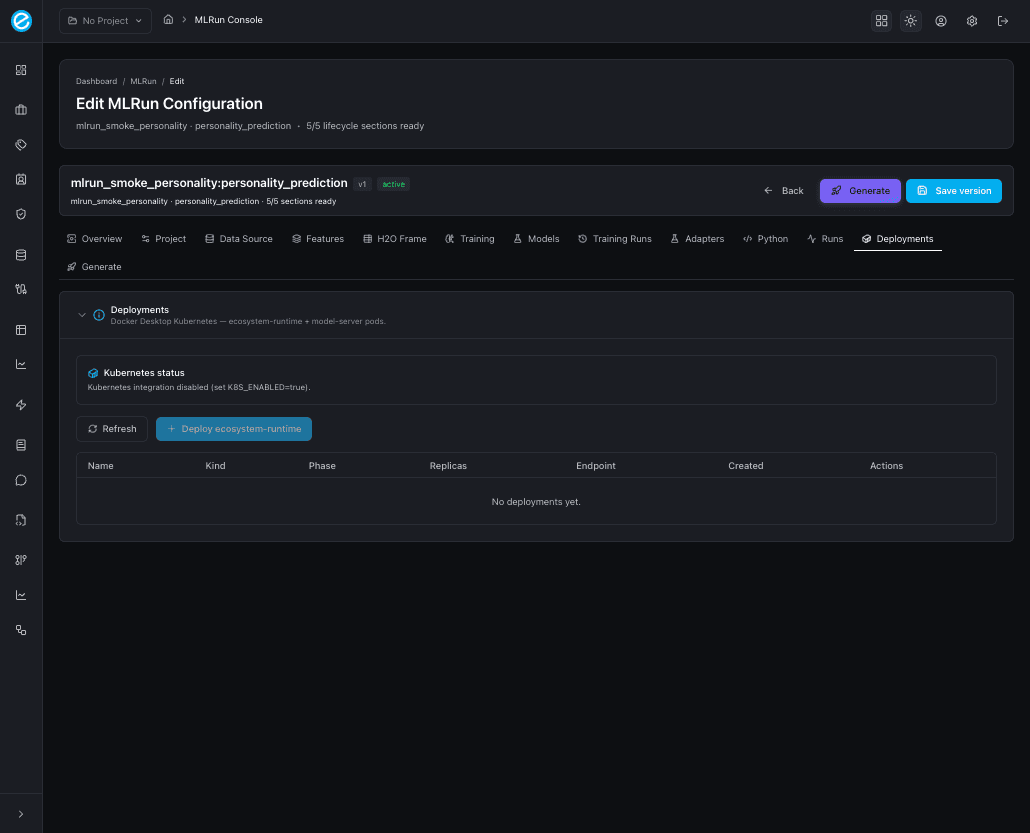
The Deployments tab is always visible inside the configuration editor, but its behaviour depends on the K8s feature flag:
K8S_ENABLED=false(default) — the tab renders a Kubernetes status banner stating “Kubernetes integration disabled (set K8S_ENABLED=true).” and a disabled Deploy ecosystem-runtime button. A Refresh button is still available so the same view can pick up a config change without a page reload.K8S_ENABLED=true— the tab activates two actions:- Deploy model server — schedules the trainer image with the
model id baked in; exposes a
/invocationsendpoint inside theecosystem-workbenchnamespace. - Deploy ecosystem-runtime — schedules the Java
ecosystem-runtimepod with a sidecar volume that mounts the trained model artifact, so scoring calls go through the same audit path as production.
- Deploy model server — schedules the trainer image with the
model id baked in; exposes a
Both actions are backed by /api/v1/k8s/* endpoints implemented in
backend/src/app/k8s/service.py.
Manifests
The bootstrap script (backend/scripts/setup-k8s.sh) creates:
- A namespace
ecosystem-workbench. - A
PersistentVolumeClaimmounted at the workbench’sLOCAL_DATA_PATH/mlrun-artifactshost path so trained models are shared across pods. - A
Service(NodePort 30091) for the deployedecosystem-runtime. - A
Service(NodePort 30092) per model server, allocated on first deploy.
When CE is also enabled, the chart installs into the mlrun
namespace (separate from ecosystem-workbench) so the two systems
can be torn down independently.
Deploy a model from the console
- In Training Runs, find a successful run.
- Click Deploy to Kubernetes → confirm.
- The row gains a Deployment id column.
- The Deployments tab now shows the model server pod with status
Running, the NodePort it bound, and a quick Test scoring link.
Scoring through ecosystem-runtime
Once the runtime pod is up, the model is reachable via two paths:
- Direct:
POST http://localhost:30092/invocations(model server NodePort). - Through ecosystem-runtime:
POST http://localhost:30091/invocatewith thecampaign/sub-campaignparameters that map back to the MLRun project / configuration. This is the recommended path because it applies the runtime’s logging, audit, and contract checks.
Coexistence with MLRun CE
When MLRUN_CE_ENABLED=true, the Helm release lives in the mlrun
namespace, while model servers and ecosystem-runtime continue to
deploy in ecosystem-workbench. The console’s Deployments tab
uses the workbench namespace; CE deployments are visible in the
MLRun UI at http://localhost:30060. There is no cross-talk between
the two — the trainer sidecar continues to handle compute regardless
of CE status.
Cleanup
Delete a deployment from the Deployments tab to remove the pod, service, and any associated PVCs scoped to that deployment id. The configuration row, training runs, and stored adapter remain untouched, so the same model can be redeployed later. To remove everything for a use-case (configuration, runs, deployments, generated artifacts), use the Delete action on the configuration row (see Access).