Python & AI Generator
Every action available in the MLRun console can be reproduced as a self-contained Python project. There are two complementary paths:
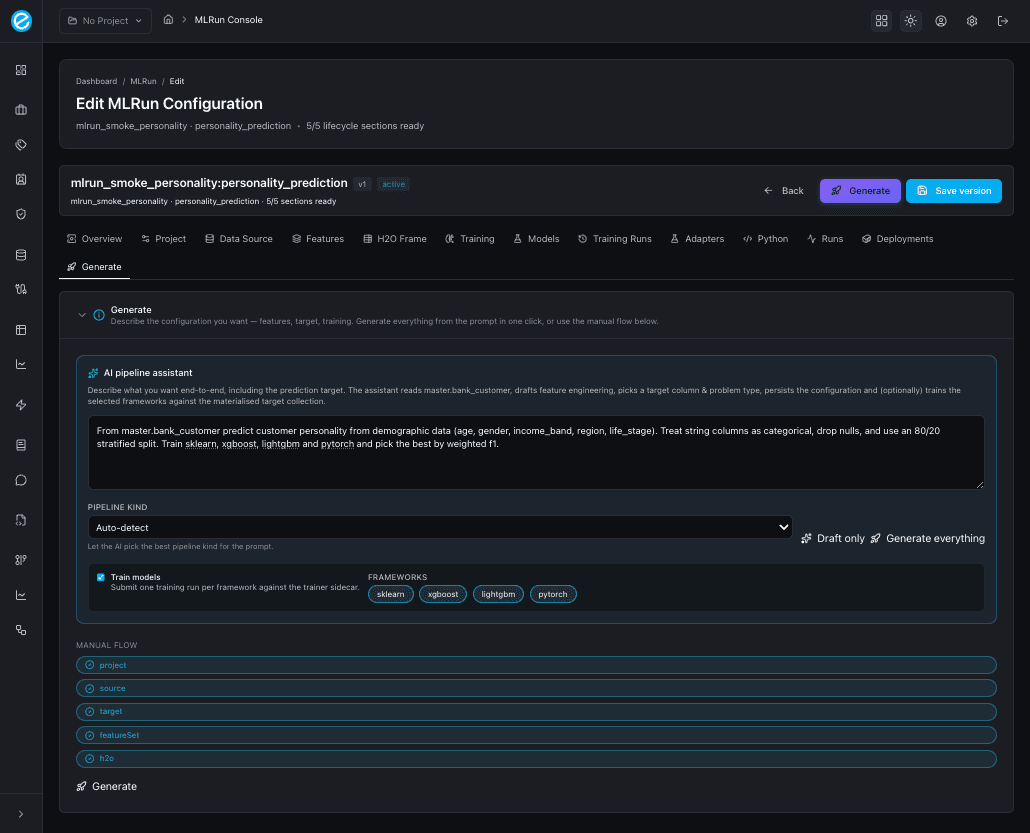
- The AI pipeline assistant on the Generate tab takes a natural-language prompt and emits the same multi-file Python project — alongside a persisted configuration and (optionally) trained models. See Console Tour — Generate tab and Data Preparation — AI assistant inputs.
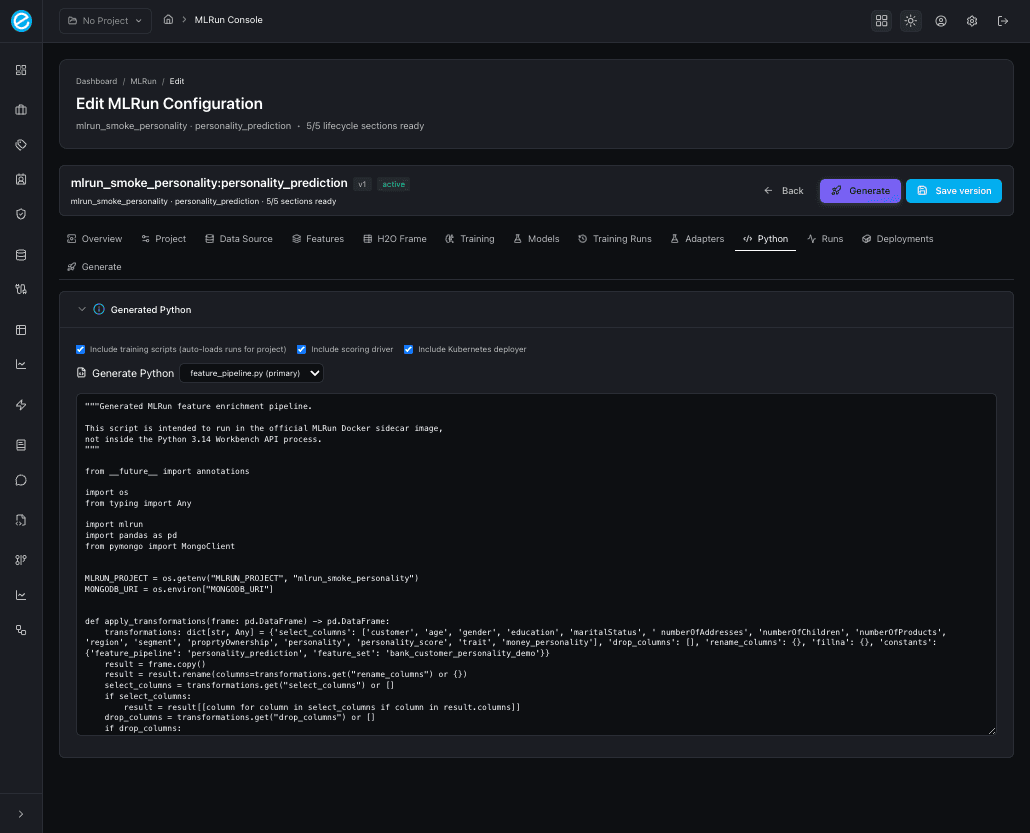
- The Python tab is the deterministic emitter. Three checkboxes pick which files land in the project; a multi-file picker lets you inspect each emitted file in turn (the primary file is marked).
Python tab inputs
| Checkbox | Adds to the project |
|---|---|
| Include training scripts (auto-loads runs for project) | train_model.py per framework, dispatched through train_all(). |
| Include scoring driver | score_model.py calling /invocations with sample payloads. |
| Include Kubernetes deployer | deploy_to_k8s.py driving the workbench /api/v1/k8s/* endpoints. |
When Include training scripts is enabled and the configuration’s
training list is empty, the backend auto-resolves the most recent
successful runs for the configuration’s project_id so the frontend
doesn’t have to pass them explicitly.
Generator inputs (full reference)
| Field | Default | Effect |
|---|---|---|
include_adapter | true | Emit a runtime-compatible adapter skeleton. |
include_h2o_frame | true | Emit the H2OFrame request stub used by the runtime. |
include_training | false (UI: opt-in) | Emit train_model.py and call POST /train per framework. |
include_scoring | false | Emit score_model.py to call POST /invocations. |
include_k8s_deploy | false | Emit deploy_to_k8s.py driving /api/v1/k8s/*. |
adapter_log_policy | null | When supplied, emit adapter_with_logging.py instead of the bare skeleton. |
trainer_url | http://localhost:8003 | Base URL for the trainer sidecar. |
workbench_api_url | http://localhost:8001 | Base URL for the workbench backend (used by the K8s deploy script). |
When include_training=true and the Training list is empty, the
backend auto-resolves the most recent successful runs for the
configuration’s project_id so the frontend doesn’t have to pass them
explicitly.
Generated Python tab UI
After clicking Generate Python, the tab populates a multi-file
project. A <select> dropdown lets you switch between files (the
primary file is marked), and the read-only editor below shows the
selected file’s contents — so you can review every emitted module
without leaving the console.
Generated files
A fully-ticked generator request emits:
| File | Purpose |
|---|---|
feature_pipeline.py | MongoDB aggregation that produces the engineered feature collection. |
h2o_frame_request.py | Stub showing how to send the engineered frame to the runtime. |
adapter_skeleton.py or adapter_with_logging.py | Either a bare adapter skeleton or one wired with the chosen log policy. |
train_model.py | One train_* per framework, all dispatched through train_all(). |
score_model.py | Calls /invocations with sample payloads built from the feature set. |
deploy_to_k8s.py | Idempotent deploy script using /api/v1/k8s/*. |
The primary_file field in the response always points at
feature_pipeline.py.
Adapter logging
When adapter_log_policy is provided, the adapter writes a payload
that ecosystem-runtime can pick up via its standard logging
collectors. The policy fields mirror
MlrunAdapterLogPolicy:
| Field | Description |
|---|---|
presented_collection | MongoDB collection where presentation rows go (default ecosystemruntime). |
accepted_collection | MongoDB collection where accepted-response rows go (default ecosystemruntime_response). |
decision_log_enabled | Toggle decision logs. |
redact_pii | Strip configured PII keys before writing. |
Running the generated project
mkdir mlrun-spend-risk && cd mlrun-spend-risk
# (paste files from the Generated Python tab)
python -m venv venv && source venv/bin/activate
pip install motor httpx pydantic
python feature_pipeline.py        # build the engineered collection
python train_model.py             # train sklearn / xgboost / lightgbm / pytorch
python score_model.py             # smoke-test scoring
python deploy_to_k8s.py           # only when K8S_ENABLED on the workbench
Every generated module accepts a --config configuration.json flag
so the same files can be checked into a CI pipeline and parametrised
per environment.
Generate tab (AI pipeline assistant)
The Generate tab is the one-click counterpart to the manual flow. The same payload that the Python tab builds from the form fields is also produced from a natural-language prompt:
- Draft only — fills the form fields without persisting; review, then click Save or run the manual flow when ready.
- Generate everything — runs the entire lifecycle: NL → schema sample → configuration → persist → train selected frameworks → emit the Python project. The result panel prints the inferred target column, problem type, feature counts, and one pill per training run.
What the generator does not do
- It does not spin up a trainer sidecar or Kubernetes cluster —
those are bootstrapped via
run_mlrun.shandsetup-k8s.sh. - It does not decide which framework to use; it generates code for each framework that has a row in the Training list (or for all successful runs when auto-resolution is enabled).
- It does not write to MongoDB unless explicitly invoked through
feature_pipeline.py.