Installation
The MLRun module has three independently switchable layers:
| Layer | Default state | Required for |
|---|---|---|
Trainer sidecar (:8003) | Enabled | Training, scoring, generated code |
| Docker Desktop Kubernetes | Off | Deployments tab, deploy_to_k8s.py |
| MLRun Community Edition | Off | Project store + UI for runs/artifacts |
1. Prerequisites
- Docker Desktop ≥ 4.30 with at least 6 CPU / 8 GB RAM allocated.
- The Workbench2 backend (
http://localhost:8001) and frontend (http://localhost:5270) running, with MongoDB reachable. - A Mongo
master.bank_transactionscollection populated for the spend-risk use-case, andmaster.bank_customerpopulated for the customer-personality use-case (both ship in the demo seeders).
2. Trainer sidecar
The trainer sidecar is a Python 3.11 FastAPI service that exposes:
POST /train— trains an sklearn / xgboost / lightgbm / pytorch model and returns metrics + model id.POST /invocations—ecosystem-runtimecompatible scoring endpoint backed by the freshly trained model.
Start it with the bundled compose file:
cd backend
./run_mlrun.sh up
The script wraps docker compose -f docker-compose.mlrun.yml up -d and
publishes the trainer on http://localhost:8003.
3. Docker Desktop Kubernetes (optional)
Enable Kubernetes inside Docker Desktop, then bootstrap the
ecosystem-workbench namespace and PV mounts:
cd backend
./scripts/setup-k8s.sh
In backend/.env, flip the K8s feature flag:
K8S_ENABLED=true
K8S_CONTEXT=docker-desktop
K8S_NAMESPACE=ecosystem-workbench
K8S_RUNTIME_URL=http://localhost:30091
Restart the backend. The MLRun console now shows a Deployments tab, and the Deploy to Kubernetes action becomes available on every training row.
4. MLRun Community Edition (optional)
When you want a full MLRun project store + UI on top of the trainer sidecar:
cd backend
./scripts/setup-mlrun-ce.sh
The script wraps helm upgrade --install mlrun-ce mlrun/mlrun-ce with
the values in backend/k8s/mlrun-ce-values.yaml. NodePorts:
| Service | URL |
|---|---|
| MLRun API | http://localhost:30070 |
| MLRun UI | http://localhost:30060 |
| MinIO | http://localhost:30090 |
In backend/.env, flip the CE flags:
MLRUN_CE_ENABLED=true
MLRUN_CE_NAMESPACE=mlrun
MLRUN_CE_RELEASE=mlrun-ce
MLRUN_CE_API_URL=http://localhost:30070
See MLRun Community Edition for the complete coexistence model.
5. Seed the two reference use-cases
cd backend
./venv/bin/python scripts/seed_mlrun_use_cases.py
Useful flags:
| Flag | Effect |
|---|---|
--use-case spend_risk | Seed only the spend-risk lifecycle. |
--use-case customer_personality | Seed only the personality lifecycle. |
--reset | Cascade-delete prior seed rows before seeding. |
--dry-run | Validate preflight without writing to MongoDB or training. |
--skip-training | Seed metadata only; skip the live trainer calls. |
--skip-k8s | Skip the optional Kubernetes deploy step. |
Successful execution writes a SEED_MLRUN_USE_CASE row to
ecosystem_meta.activities per use-case with the framework list,
succeeded count, and elapsed seconds.
6. Verify in the console
Open http://localhost:5270/mlrun-console. Both Customer Spend
Risk and Customer Personality rows should be visible in the
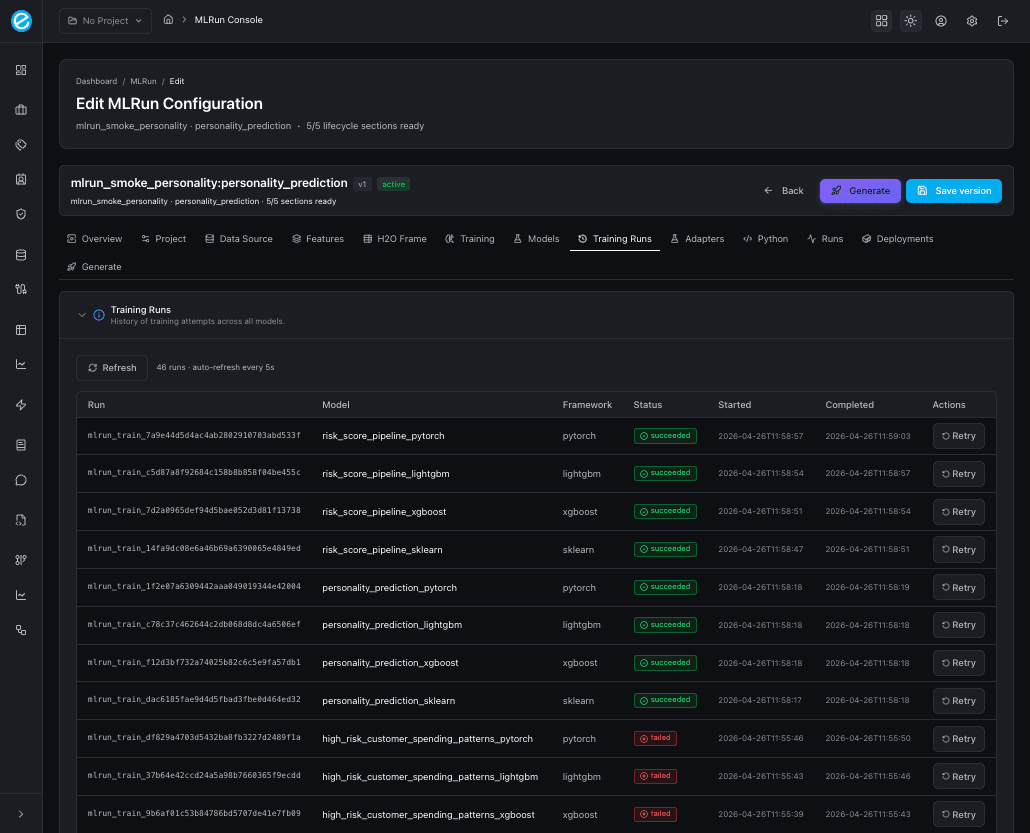
Configurations table, and the Training Runs tab should list four
successful runs per use-case.