API Keys
Admins manage credentials at Administration → API Keys. The page has two access modes:
- Public API Access — scoped keys for the public gateway and HTTP MCP
- Private Ecosystem Keys — generated ecosystem JWTs for internal platform services
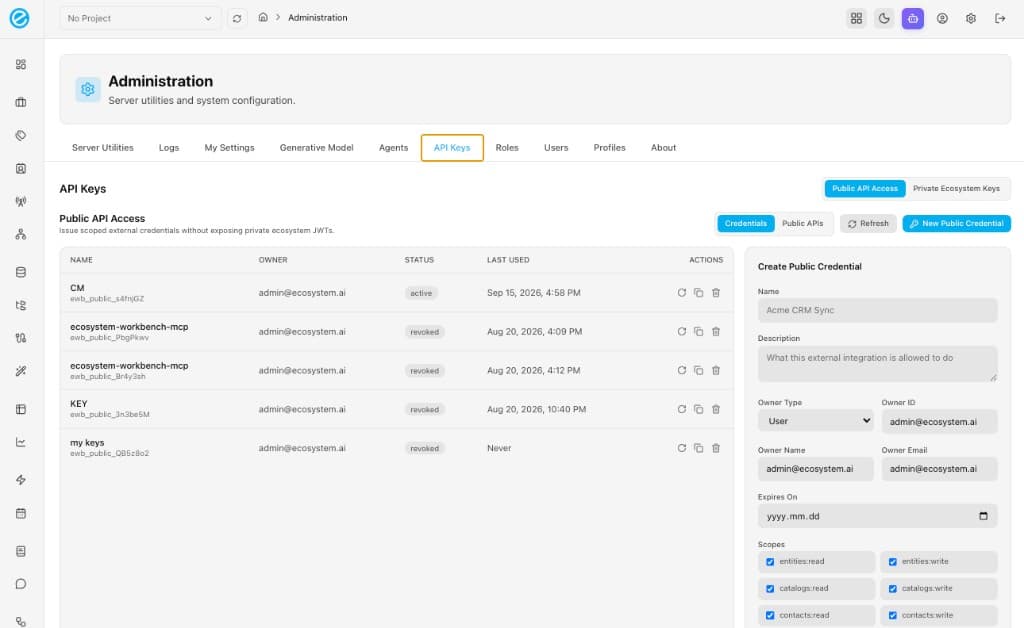
Public API Access
Use this tab for notebooks, partner apps, Campaign Management, and MCP clients that must not receive a private ecosystem JWT.
Credentials vs Public APIs
| Sub-tab | What it shows |
|---|---|
| Credentials | Issued keys: name, owner, status (active / revoked / expired), last used, copy/rotate/revoke |
| Public APIs | Live catalog from GET /api/v1/admin/public-api-credentials/catalog. Accessible / Locked badges follow the scopes on the selected credential |
Create Public Credential
New Public Credential fields:
| Field | Notes |
|---|---|
| Name | Unique label (for example CM, ecosystem-workbench-mcp) |
| Description | What the integration is allowed to do |
| Owner type | user, service_account, organization, or partner |
| Owner ID / name / email | Who owns the key. created_by stays the acting admin |
| Expires on | Optional. Empty means no expiry |
| Scopes | Checkboxes. Only grant what the integration needs |
| Linked internal key | Optional. When callers use only a public key on :8004 or HTTP /mcp, private backend calls use this linked internal API key (Administration → API Keys → Public API Access → edit credential). Only the key id is stored server-side |
The raw secret is shown once on create or rotate. Prefix is ewb_public_. If the owner loses it, rotate — do not expect reveal after the one-time display unless the admin uses the reveal endpoint while the hashed secret is still recoverable.
Status:
- active — usable
- revoked — admin revoked; calls fail
- expired — past
expires_on
Calling the gateway after minting
Send one credential:
- a public key —
X-API-Key: ewb_public_…orAuthorization: Bearer ewb_public_…, or - a Workbench user JWT —
Authorization: Bearer <jwt>
With a public key, that credential’s scopes and resource bindings apply; private calls use the internal API key linked on the credential (Public API Access → edit credential → Linked internal key). Only the key id is stored. With a JWT, the user’s Workbench roles apply and public scopes are ignored.
Sending both still works: scopes apply and the JWT is forwarded. When Authorization already holds the public key, carry a JWT as X-User-Token.
PUBLIC_API_INTERNAL_SERVICE_TOKEN is a deployment fallback for automated jobs only — not for interactive users.
Login without a public key:
POST /public/v1/auth/login
Content-Type: application/json

{"email":"you@example.com","password":"…"}
Interactive check: open http://localhost:8004/ and paste the public key.
Resource bindings
Optional limits on a credential (resource_bindings):
project_ids— restrict to named projectscatalog_ids— restrict Contact Setsentity_names— restrict entity collections. Empty allows all public collections
public_api_credentials and public_api_audit_events are never exposed as entity collections.
Admin HTTP (private API)
These routes sit on the private API (:8001) and require an admin JWT. They issue public credentials; they are not public-gateway routes.
| Method | Path |
|---|---|
GET | /api/v1/admin/public-api-credentials |
POST | /api/v1/admin/public-api-credentials |
GET | /api/v1/admin/public-api-credentials/catalog |
POST | /api/v1/admin/public-api-credentials/{id}/rotate |
GET | /api/v1/admin/public-api-credentials/{id}/secret |
| revoke / usage | same prefix on the credentials router |
Audit events land in ecosystem_meta.public_api_audit_events (credential lifecycle, successes, missing/invalid/expired/revoked keys, scope denials). Records must not store raw secrets, private JWTs, or request bodies.
Private Ecosystem Keys
Switch to Private Ecosystem Keys for Grafana, ecosystem-server, and other services that expect a generated ecosystem JWT.
| Action | Behaviour |
|---|---|
| Create New | Name, description, validity in days |
| Generate | Workbench posts to ecosystem-server POST /api/generate-api-key and stores metadata in ecosystem_meta.api_keys |
| Copy / hide | Reveal the stored key in the form |
| Delete | Removes the Mongo document |
A private ecosystem key is not ewb_public_…. Do not put it in X-API-Key for :8004. Do not hand it to partners. The Public API Access copy on this screen exists so you can issue scoped external credentials without exposing private ecosystem JWTs.
Private-key admin routes (admin JWT on :8001):
| Method | Path |
|---|---|
GET | /api/v1/admin/api-keys |
POST | /api/v1/admin/api-keys/generate |
PUT | /api/v1/admin/api-keys/{id} |
DELETE | /api/v1/admin/api-keys/{id} |
Grafana and post-install data views historically used Management → Generate API Keys. In Workbench 2 that is this Private Ecosystem Keys list.
Python client packages
| Package | Use |
|---|---|
sdk/python/ecosystem_workbench_public | Typed client for :8004/public/v1 |
sdk/python/ecosystem_workbench_mcp | stdio MCP harness that mints/uses EWB_PUBLIC_API_KEY |
Env for the public client:
export EWB_PUBLIC_API_KEY="ewb_public_…"
# JWT from login, or let the MCP harness mint from EWB_ADMIN_EMAIL / EWB_ADMIN_PASSWORD