Networks
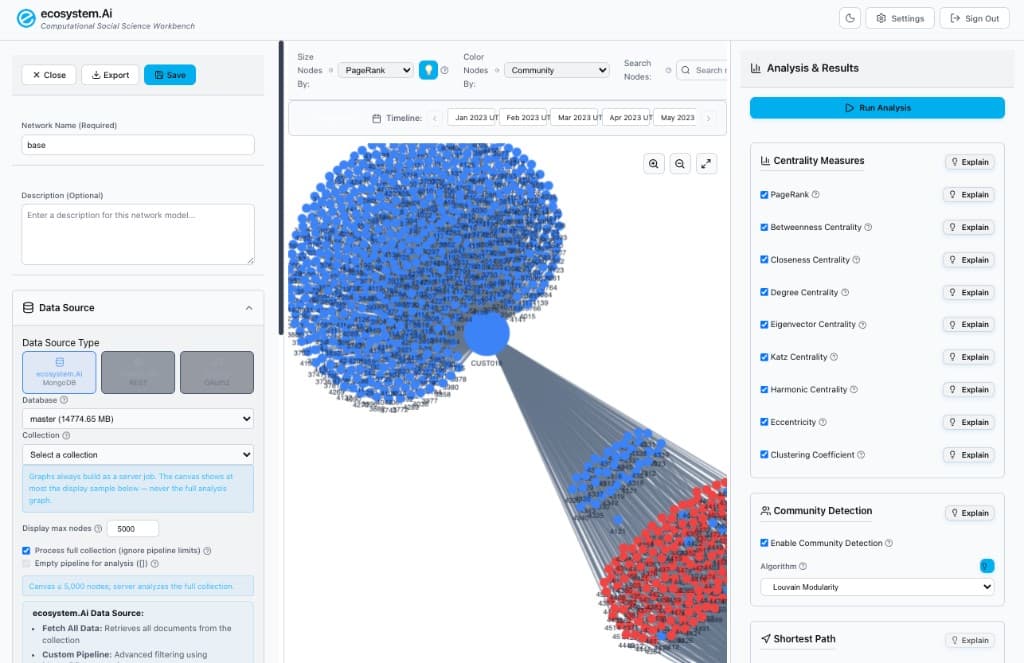
Networks is the Workbench2 graph workspace. Open it from Solutions → Network Analysis or go to /networks/ on the same origin as Workbench (local: http://localhost:5270/networks/).
It is not the Network Selector. Selector routes POST /invocations traffic across Runtime configurations. Networks builds and analyzes graphs (customers, offers, transactions, knowledge) and writes optional metrics back to Mongo.
Where it fits
| Stage | Component | Repo |
|---|---|---|
| Operator UI | /networks/ SPA (second Vite HTML entry) | ecosystem-workbench2 (frontend/networks/) |
| Graph build & analysis | FastAPI /api/graphtheory/* (NetworkX) | ecosystem-workbench2 backend |
| Saved models | Mongo networks.network_configs | Workbench2 |
| Dashboards | Analytics can bind a saved network config | Workbench2 /analytics/ |
| Runtime scoring | Separate: Dynamic Engagement Network Analysis approach, or Network Selector | ecosystem-runtime |
Sign in once on Workbench. /networks/ shares ecosystem_auth; unauthenticated visits redirect to /login?next=….
What it is for
Use Networks when you need structure, not a ranked offer list:
- Find hubs (PageRank, degree, eigenvector) in a customer–offer or transaction graph
- Detect communities (Louvain or Girvan–Newman) and color the canvas by cluster
- Measure bridges and social influence
- Walk shortest paths between two nodes
- Slice a graph by time and run temporal algorithms
- Treat the graph as a knowledge graph (ontology, inference, semantic path)
The canvas never loads the full million-edge graph. Build and analyze run as async jobs on the backend. The UI shows a display sample of at most 5 000 nodes (default 1 000, typically top degree or top PageRank) with induced edges.
The browser collects mappings and analysis checkboxes, then calls Workbench2. Do not expect the SPA to compute PageRank or Louvain locally.
Graph modes
When you generate the graph, pick a mode. It changes which right-hand panel you get after Run Analysis.
| Mode | Use |
|---|---|
| Standard | Centrality, community detection, shortest path |
| Social | Influence, reciprocity, echo chambers, friend recommendations, structural holes |
| Knowledge | Ontology load / auto-generate, schema validation, inference, related entities |
Graph type can be directed, undirected, bipartite, or weighted. Map source documents to node id / label and edge source / target (optional weight and multiple edge types).
Typical path
- Open Network Analysis (
/networks/). Name the model and Save. - Choose a data source, database, and collection. Optionally process the full collection; keep Display max nodes at or below 5 000. Click Fetch Data.
- Map node and edge fields, then Generate Graph (async job).
- Size / color nodes (for example PageRank and Community), then Run Analysis.
- Optional: social, knowledge, timeline, Explain, Export, write metrics back to Mongo.
In this module
- Workspace — three panes, save/export, canvas vs analysis
- Data Sources — Mongo, REST, Spotify, mappings, display sample
- Analysis — centrality, Louvain / Girvan–Newman, shortest path
- Social, Knowledge & Time — SNA, ontologies, temporal jobs, writeback
- Jobs & API —
/api/graphtheory, public/public/v1/networks, MCP tools
Related
- Network Selector — Runtime request routing (
PostScoreNetwork) - Network Analysis algorithm — Dynamic Engagement
approachthat ranks offers from an acceptance network - Ontology for agents — Runtime closed-loop vocabulary (separate from Networks ontologies)