Data Agents
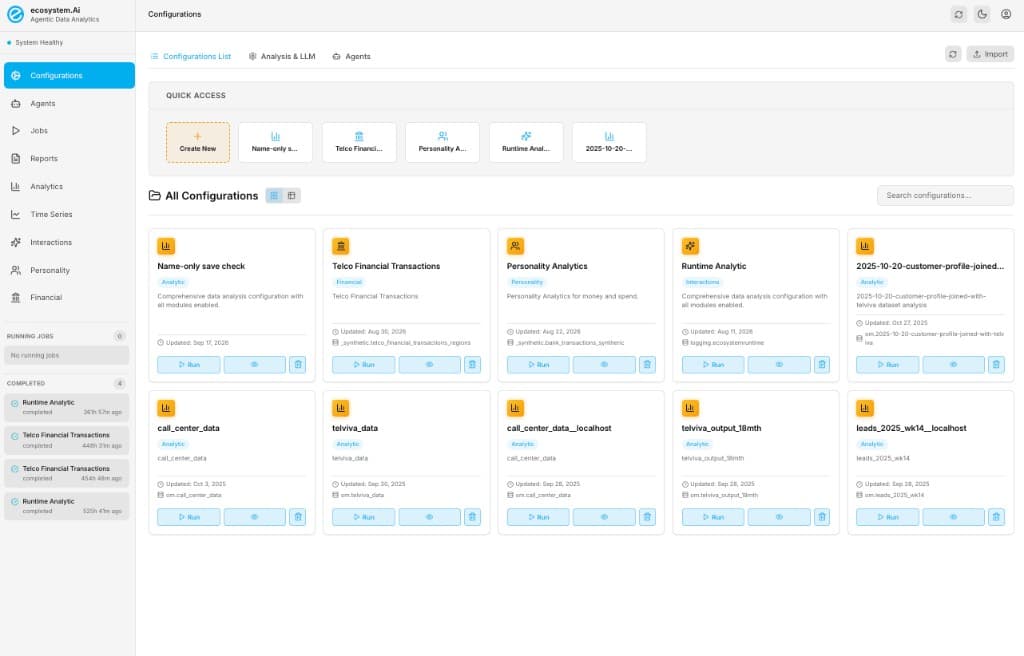
Data Agents is the Agentic Data Analytics console (ecosystem-data-agents). It extracts, prepares, and analyzes customer or event data, then writes markdown reports, notebooks, and graphs. Local UI is http://localhost:54325 (API http://localhost:54324).
It is not the Runtime scorer, Spend Personality scoring module, or EcoGentic customer journeys. Scoring still uses POST /invocations then POST /response. Data Agents reads collections (Mongo or Trino) and reports.
The SPA stores ecosystem_auth and sends Authorization: Bearer. Login proxies to Ecosystem Server. Set AUTH_ENABLED=false only for offline local work.
Where it fits
| Stage | What |
|---|---|
| Operator UI | React SPA — Configurations, Agents, Jobs, Reports, domain dashboards |
| Pipeline | LangGraph: extract → prepare → analysis families |
| Data | MongoDB (MONGO_CONNECT) or Trino (extract-only; writes stay on Mongo) |
| Artifacts | reports/<timestamp>/ — markdown, .ipynb, graphs/, JSON |
Configuration types
Pick a type when you Create New. It decides collections, analysis families, and which reports appear.
| Type (card badge) | Use | Primary source |
|---|---|---|
| Analytic | Profiling, categorical tests, actuarial risk, feature engineering, optional time series | One wide customer/event table |
| Interactions | Recommender / NBA — campaigns, offers, customers, experiments | Runtime-style calls collection (ecosystemruntime) |
| Personality | Spend / money mix, drift, category patterns, campaign overlays | Transactions (customer, amount, category, time) |
| Financial | ARPU, ROI, LTV, NRR, ledgers — only mapped fields | Revenue events or sales/GL ledgers |
Do not use Analytic for ARPU/ROI (use Financial). Do not use Personality for ledger KPIs. Do not point Interactions at a generic sales ledger.
Typical path
- Setup — Create New, choose type, bind Mongo or Trino, enable analysis families, Save.
- Interactions Analytic — For recommender logs: discover predictors, join calls to responses, read family reports.
- Process — Run on the card (or Jobs). Watch extract → prepare → analysis.
- Reports — Open markdown / notebook / graphs for that job.
- Analysis views — Interactive dashboards (
/analysis/:jobId, Time Series, Interactions, Personality, Financial).
Sidebar
| Nav | Route | Role |
|---|---|---|
| Configurations | /configurations | List, create, Analysis & LLM, Agents tab |
| Agents | /agents | LLM specialists + MCP tools over jobs/reports |
| Jobs | /jobs | Queue, logs, force-stop, analysis dashboard |
| Reports | /reports | All artifacts for a completed job |
| Analytics | /analytics | Job success / volume (ops, not domain KPIs) |
| Time Series | /time-series | Analytic time-bucket / journey reports |
| Interactions | /recommender | Offer / campaign reports |
| Personality | /personality | Spend/money/drift reports |
| Financial | /financial | Unit economics reports |
Running and recent completed jobs sit in the left rail (as in the screenshot).
In this module
- Setup — types, sources, Analysis & LLM
- Interactions Analytic — recommender call/response analysis
- Process Jobs — Run, pipeline steps, logs
- Reports — how to open artifacts, plus a page for each report type
- Analysis Views — dashboards per domain
Related
- Spend Personality — Workbench/Runtime scoring of traits (Data Agents analyzes personality collections)
- Networks — graph lab, not tabular reports
- Ontology for agents — Runtime closed-loop vocabulary